
Legal services run on trust. A client choosing an attorney isn’t just comparing credentials — they’re deciding whether they feel confident enough to hand over their most sensitive problems. That decision often begins before the first consultation, with a handshake, a referral, or a card. Signify digital business cards are changing how law firms handle that moment. Instead of a paper rectangle that gets lost or goes out of date, every attorney gets a live, branded profile that shares credentials, practice areas, scheduling links, and contact options in one tap — and stays current for every client who has ever saved it. This guide covers why law firms are adopting digital cards, how to use them without running afoul of bar advertising rules, and what a firm-wide rollout looks like with Signify Teams.
The timing is practical. The ABA’s 2025 Profile of the Legal Profession counts more than 1.37 million active lawyers in the United States, and roughly 70% of lawyers use LinkedIn for professional networking — meaning most attorneys are already networking digitally, even if their card isn’t[reference:0]. Clients, meanwhile, expect to verify credentials quickly: a Signify digital business card can link directly to a state bar profile, a firm bio, published articles, and a booking calendar, so verification takes seconds instead of a phone call. And with 88% of paper cards discarded within a week, the traditional card was never a reliable trust signal to begin with[reference:1].
The trust challenge in legal services
Legal services are a high-consideration purchase. A client isn’t buying a commodity; they’re handing over a dispute, a transaction, or a life event that matters deeply to them. That makes the trust threshold higher than in almost any other professional service, and it makes every signal of competence and reliability disproportionately important.
Referrals remain the dominant acquisition channel. According to Clio’s 2025 Legal Trends Report, nearly 59% of clients choose a lawyer based on a trusted recommendation, and clients acquired through referrals have a 37% higher retention rate[reference:2]. That means most new clients arrive already predisposed to trust — but they still want to verify. A paper card gives them a name and a number; a digital card gives them a path to the firm bio, the attorney’s credentials, recent published work, and a way to book a consultation without a phone tag cycle.
Where paper cards fall short for law firms
Paper cards aren’t a trust problem because they’re traditional — they’re a trust problem because they fail at the moments trust is being formed.
They go out of date
Attorneys change practice areas, move firms, update direct lines, and add credentials. Every printed card handed out before a change is now incorrect. A client who calls an old number and reaches a dead line doesn’t think “the attorney changed firms” — they think the attorney is hard to reach. A Signify profile updates once and stays current for every recipient.
They can’t carry credentials
A paper card has room for a name, a title, a phone number, and maybe a bar number. It can’t link to a state bar profile, a published article, a case result, or a practice-area page. That means the verification work — the exact thing a prospective client wants to do — has to happen elsewhere, and most people won’t bother. A digital card can put all of it one tap away.
They don’t scale across a firm
At a multi-attorney firm, paper cards create inconsistency: different designs, different titles, different phone formats, different email conventions. A client who meets three attorneys from the same firm may receive three cards that look like they came from three different organizations. Signify Teams solves this with branded templates that keep every card visually consistent while preserving each attorney’s individual details.
What clients actually expect
Client expectations have shifted in ways that paper cards can’t accommodate. Four expectations show up consistently in legal consumer research and in the behaviour firms see at intake.
Immediate access to credentials
Clients want to verify bar admission, practice areas, and experience without calling the firm.
Tech-savvy representation
A professional digital presence signals that the firm operates efficiently in a modern client environment.
Seamless scheduling
Clients expect to book a consultation without a back-and-forth email chain.
Multiple contact channels
Phone, email, and messaging options should all be available from the same profile.
A paper card can’t meet any of these expectations on its own. A digital card can meet all four from a single share.
Digital cards as a credibility layer
The strongest argument for digital cards in legal services isn’t convenience — it’s credibility. A well-designed digital card does several things at once that a paper card cannot.
It links to verifiable credentials
Include a link to your state bar profile, your firm bio, your published articles, and your professional associations. A client who can verify your admission and experience in two clicks is a client who arrives at the consultation already reassured. Signify’s card builder supports unlimited links and documents, so the verification path can be as complete as you need it to be.
It presents a consistent firm identity
Branded templates in Signify Teams let a firm enforce colors, logos, and layout across every attorney’s card while preserving individual practice-area details. A client who meets three attorneys from the same firm sees three cards that clearly belong to the same organization.
It updates in real time
When an attorney changes roles or adds a practice area, the card updates once and every saved copy reflects the change. No reprints, no outdated credentials in circulation, no client confusion about who to call.
It captures leads without friction
Signify’s lead-capture forms let a prospective client share their details directly from the card, which means the firm can follow up without relying on a manual exchange. For firms that track intake conversion, this closes a gap that paper cards leave open.
It provides engagement data
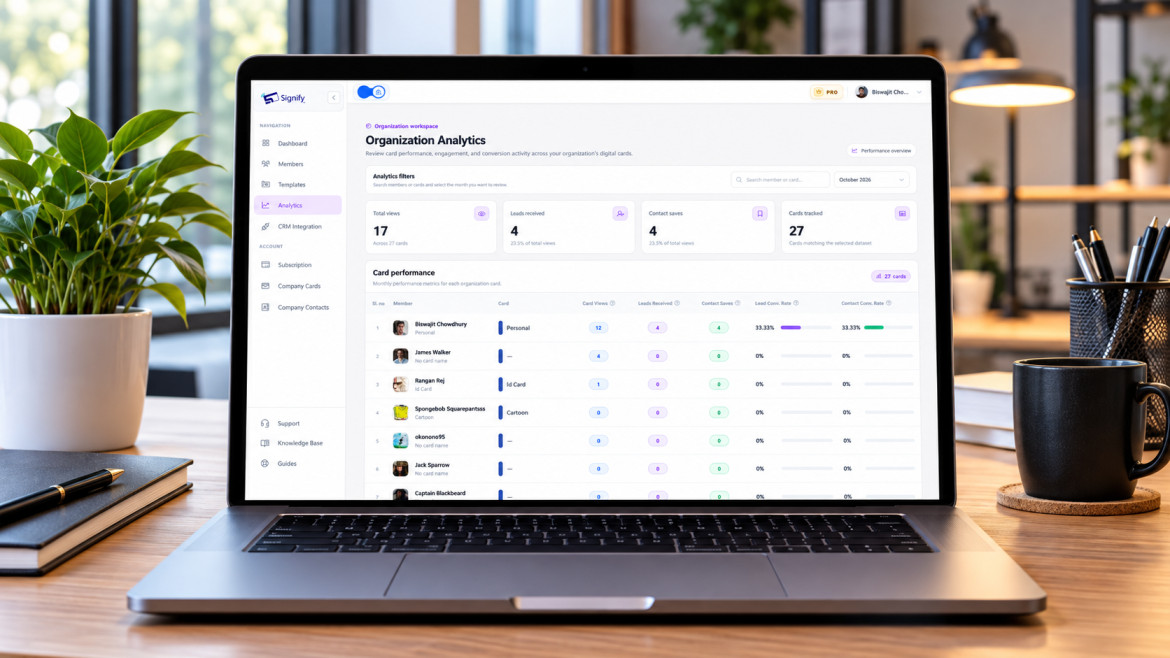
Firms can see views, saves, and link clicks — which practice areas generate interest, which events produce engagement, and where follow-up should focus. The analytics layer turns networking from an unmeasured activity into a trackable one.
Staying compliant with bar advertising rules
Legal professionals are rightly cautious about anything that touches advertising and solicitation rules. The good news is that a basic business card has historically been treated as outside the core of those rules. The ABA has noted that business cards containing a name, firm, address, and contact information are generally not subject to the Rules of Professional Conduct, provided the information is not false or misleading[reference:3].
That distinction matters for digital cards. A card that functions as a contact and credential profile — name, firm, bar number, practice areas, contact options, booking link — sits comfortably within the traditional business-card exception. A card that makes comparative claims, promises outcomes, or reads like a sales pitch moves into advertising territory and should be reviewed against Rule 7.1 and your jurisdiction’s rules.
The Signify company page describes secure sharing and privacy-first design as core principles, but firms should still confirm that any third-party tool meets their own data-handling and confidentiality obligations before deploying it at scale.
Building client trust through technology
Trust is built through small signals of competence and reliability. A digital card delivers several of them at once.
First-impression professionalism
A well-designed card signals that the attorney takes the relationship seriously. That matters at the exact moment a prospective client is forming an opinion — often in the first few seconds of a meeting or a referral introduction.
Transparent communication
Include office hours, response-time expectations, and multiple contact channels. A client who knows what to expect is a client who feels in control. A Signify profile can carry all of it without crowding the card.
Credential verification
Link directly to the state bar profile, firm bio, and recent published work. The client can verify independently, which is far more persuasive than a claim on a card.
Effortless scheduling
A booking link removes the most common friction point in legal intake. A client who can schedule a consultation directly from the card is a client who doesn’t lose momentum between the introduction and the first meeting.
How different firm types use digital cards
Digital cards serve different purposes at different scales. The table below maps the primary use case to the firm type.
| Firm type | Primary advantage | Key Signify feature |
|---|---|---|
| Solo practitioner | Competes with larger firms on presentation and accessibility | Custom themes, portfolio links, booking integration |
| Small firm (2–10 attorneys) | Consistent identity without a marketing department | Shared templates, Signify Teams basic seats |
| Mid-size firm | Brand consistency across practice groups | Role-based templates, shared contacts, analytics |
| Large firm (100+ attorneys) | Centralized governance and CRM integration | Seat management, CRM sync, team-wide analytics |
| Public defender / legal aid | Fast resource sharing with clients who lack consistent access | Link-based sharing, no app required for recipients |
The common thread is that digital cards let a firm present a coherent identity while giving each attorney the tools to build individual client relationships.
Firm-wide rollout with Signify Teams
For firms with more than a handful of attorneys, individual cards create a governance problem: different designs, different branding, different levels of completeness. Signify Teams solves it with a central dashboard and a set of features designed for organizational consistency.
Centralized seat management
Invite attorneys by email, assign roles (Owner, Admin, Manager, Member), and manage seats from one dashboard. Onboarding a new associate or lateral hire takes minutes rather than a design cycle.
Branded templates
Create a shared card template with firm colors, logo, and layout, then let each attorney fill in their own details. Every card is visually consistent without requiring central design work for each new hire.
Shared company contacts
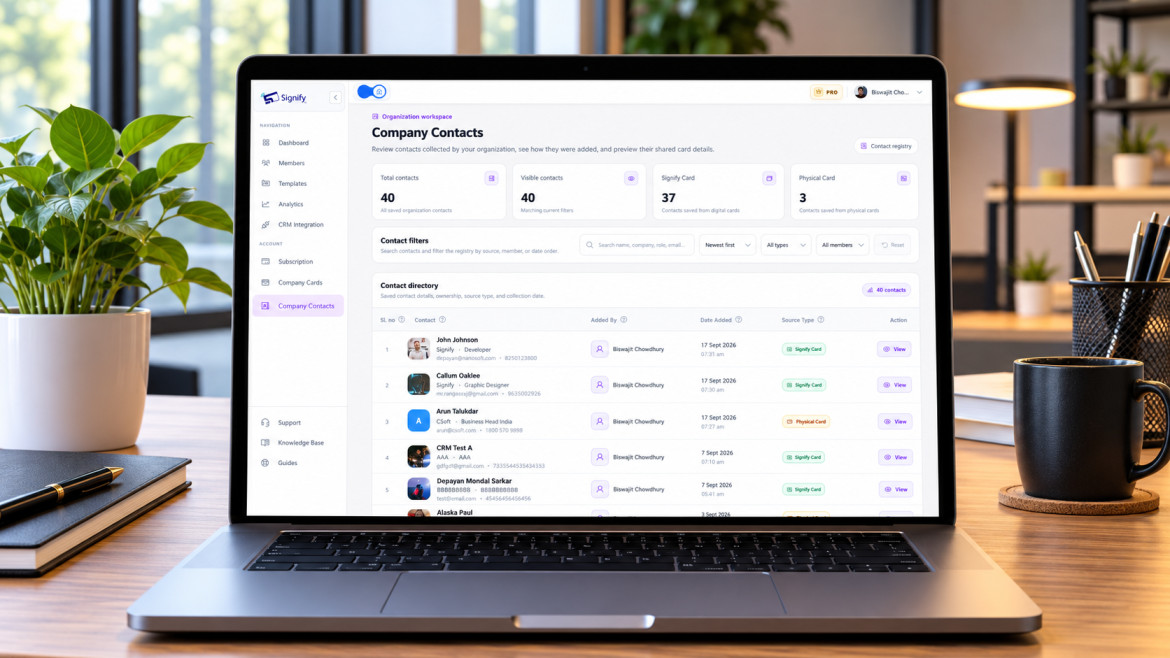
All contacts saved by any team member appear in a single directory, with notes, tags, and follow-up reminders. For a firm where multiple attorneys may meet the same prospective client at different events, this prevents duplication and missed follow-up.
Team analytics
Track views, saves, and leads by card or by attorney. Firms can see which practice areas generate interest and which events produce engagement, then adjust marketing and networking priorities accordingly.
CRM integration
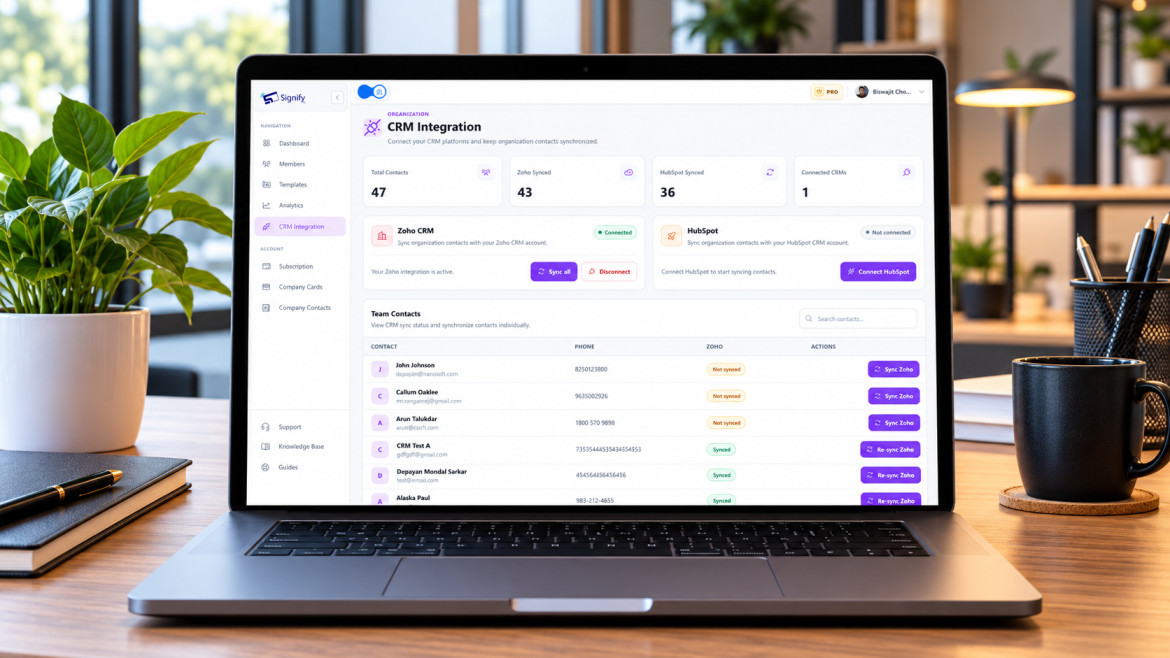
Contacts can be pushed to Zoho CRM automatically, with bulk sync and re-sync on updates. Firms that already run a CRM don’t have to add a manual export step to the intake workflow.
For firms that also want a public-facing business page, Business Brief complements the team dashboard by giving the firm a single branded page with contact options, location, and links to attorney cards. Together, they replace a patchwork of printed collateral and static web pages with a coordinated digital presence. Current plans and per-seat pricing are on the Signify pricing page.
Implementation best practices for law firms
A successful rollout is less about the tool and more about the governance around it. These practices keep a firm’s digital cards consistent, compliant, and useful.
- Design the template centrally. Let the firm control logo, colors, and required fields, and let attorneys personalize only the permitted sections. This prevents visual drift across practice groups.
- Define a credential checklist. Decide which fields every card must include — bar number, practice areas, firm bio link, direct line, booking link — and make them part of the template.
- Review content against Rule 7.1. Have marketing or compliance review the template and any permitted personalization before rollout. Keep the card informational, not promotional.
- Train on sharing methods. Attorneys should be comfortable with NFC tap, QR code, and link sharing before the first client interaction.
- Add the card to email signatures. A Signify email signature puts every attorney’s card in every outgoing message, which is the highest-ROI extension for most firms.
- Review analytics quarterly. Use the team dashboard to see which practice areas and events produce engagement, and adjust networking priorities accordingly.
- Keep personal details off the public profile. Attorneys should share professional contact channels through the card and keep personal phone numbers and addresses private, consistent with the firm’s confidentiality practices.
For a deeper walkthrough of card setup, field configuration, and sharing methods, the Signify Insights library has step-by-step guides that apply across professional services.
Frequently asked questions
Do clients need an app to view an attorney’s digital card?
No. The card opens in a standard web browser on any smartphone, tablet, or computer. That matters for legal clients, who may be using an unfamiliar device or may not want to install another app during a stressful period.
Are digital business cards compliant with bar advertising rules?
A business card that contains only name, firm, address, and contact information is generally treated as outside the core of the advertising rules, provided it is not false or misleading. Cards that make comparative or outcome claims move into advertising territory and should be reviewed under Rule 7.1 and your jurisdiction’s rules. Keep the card informational and have compliance review the template before rollout[reference:4].
Can a firm keep every attorney’s card visually consistent?
Yes. Signify Teams supports shared card templates with locked branding elements and permitted personalization, so every attorney’s card reflects the firm’s identity while carrying their individual details.
How do digital cards help with client intake?
The card can include a booking link, multiple contact channels, and a lead-capture form. A prospective client can schedule a consultation or share their details directly from the card, removing the friction that causes many referrals to stall between introduction and first meeting.
Can the card link to a state bar profile and firm bio?
Yes. Signify supports unlimited links and documents on a card, so attorneys can link to their state bar profile, firm biography, published articles, and professional association pages — giving clients a direct verification path.
What happens when an attorney changes firms or practice areas?
The card updates once, and every saved copy reflects the change. No reprints, no outdated contact details in circulation. Firms should include a profile-update step in their offboarding or role-change process.
Does Signify integrate with a firm’s CRM?
Yes. Signify Teams integrates with Zoho CRM, with one-click sync, bulk sync for unsynchronised contacts, and re-sync when details change. Firms with other CRM systems should confirm compatibility before rollout.
Is there a free plan for solo practitioners?
Yes. Signify offers a free tier for individual professionals that covers core card creation, sharing, and basic analytics. Paid plans add more cards, custom branding, and team features. The pricing page has current details.
Can attorneys share their card in person and remotely?
Yes. In person, they can use NFC tap or a QR code. Remotely, they can send a link or use an email signature. The same profile works across all four methods.
What analytics does a firm get from Signify Teams?
Firms can track views, saves, and leads by card or by attorney, and export reports for management review. This makes it possible to see which practice areas and events generate engagement, and to adjust networking priorities accordingly.
Give every attorney a card that earns trust
Build a Signify digital card that shares credentials, books consultations, and stays current — then roll it out across your firm with branded templates and a central dashboard.
Create a free digital card