
A paperless networking strategy doesn't mean giving up the handshake — it means replacing the static, wasteful paper card with a dynamic Signify digital business card that stays current, tracks engagement, and shares instantly via QR code, NFC tap, or direct link. This guide walks through the environmental case, the financial case, and the practical steps to make the switch — whether you're an individual professional or rolling out to an entire organization.
Traditional business cards carry hidden costs that most companies never measure: reprints every time someone changes roles, cards that go out of date before they're even handed over, and an estimated 88% that end up in the bin within a week. Signify's virtual business card platform addresses each of these directly. Below, we'll compare paper and digital, explain the four sharing methods Signify supports, and give you a step-by-step path to going paperless without disrupting your professional identity.
Why digital networking outperforms paper
Going paperless isn't just an environmental decision — it's a strategic upgrade to how your brand is presented and how your network is captured. These six benefits drive measurable outcomes for individuals and teams.
Modern brand image
A digital card signals that your brand is forward-thinking, tech-savvy, and committed to sustainability.
Always up-to-date
Change your title, company, or phone once — every shared card reflects the update instantly. No reprints.
One-tap connections
Recipients save your contact, open your site, or connect on social with a single tap — no manual entry.
Trackable engagement
See views, saves, and link clicks. Paper gives you zero data; Signify gives you actionable analytics.
Real cost savings
Eliminate print, reprint, and distribution costs. Signify's pricing starts free.
Team consistency
Signify Teams keeps every employee's card on-brand and centrally managed.
For organizations evaluating a rollout, the case is strongest when you combine individual savings with brand consistency. A single, centrally managed card template ensures that every employee's smart business card reflects current messaging — no more mismatched business cards, obsolete titles, or off-brand colors in circulation.
Build your digital card
Sign up for a free Signify account and open the card editor via Create a Card. Start with your core identity: name, job title, company, profile photo. Then add the fields that matter for your role — email, phone, website, calendar link, LinkedIn, X, or any of the supported social and messaging platforms.
Signify's editor supports two core layouts (Canvas and Slate) and multiple themes, so you can match your card to your personal brand or your organization's visual guidelines. If you're rolling out to a team, start from a branded template instead — every employee's card inherits the same structure and colors, reducing per-card design time.
Once you've saved the card, add a QR code or pair it with an NFC card for a physical option. Both are generated automatically from the same profile — no separate build step.
Track engagement and leads
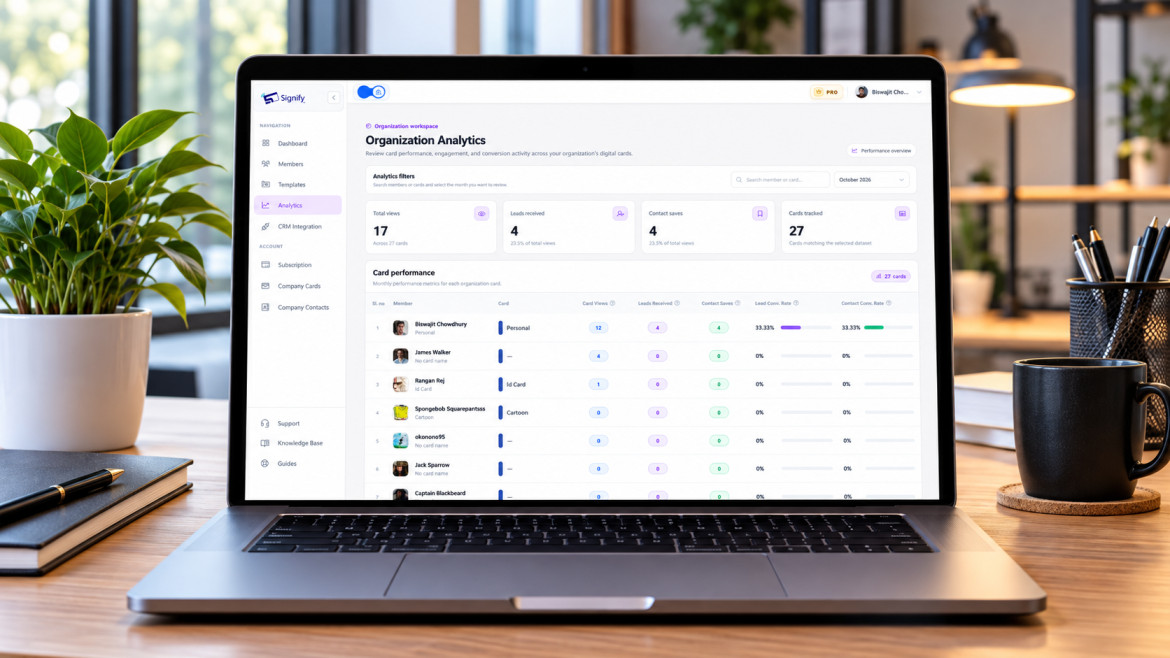
One of the most under-appreciated advantages of going paperless is the analytics that come with it. Every Signify card reports on views, contact saves, and link clicks — giving you a feedback loop that paper cards can never provide. You can see which of your shared links actually drives action, and which field of your card gets the most attention.
For teams, this matters even more. Signify Teams aggregates analytics across every employee card, so you can measure networking ROI at a company level. If your sales team is at a conference, you can see how many cards were scanned, how many contacts were saved, and where those contacts went after — all without asking anyone to fill out a report.
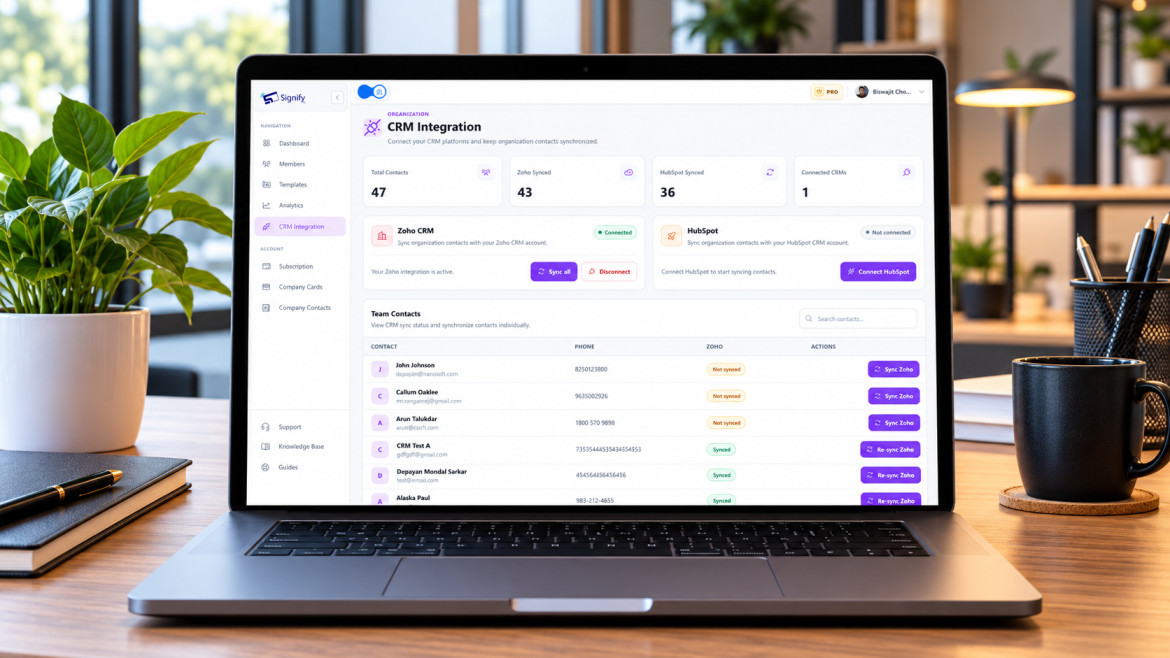
Leads captured through Signify can be organized, tagged, and pushed to your CRM. Signify currently supports Zoho CRM integration, with contact notes and tag support on team plans.
Roll out across your team
Individual adoption is easy. Organizational adoption requires a bit of coordination — but Signify Teams is designed to make this straightforward. From a central dashboard, you can:
- Invite team members by email and assign seats based on your plan tier
- Deploy branded card and email-signature templates
- Manage roles and permissions across the team
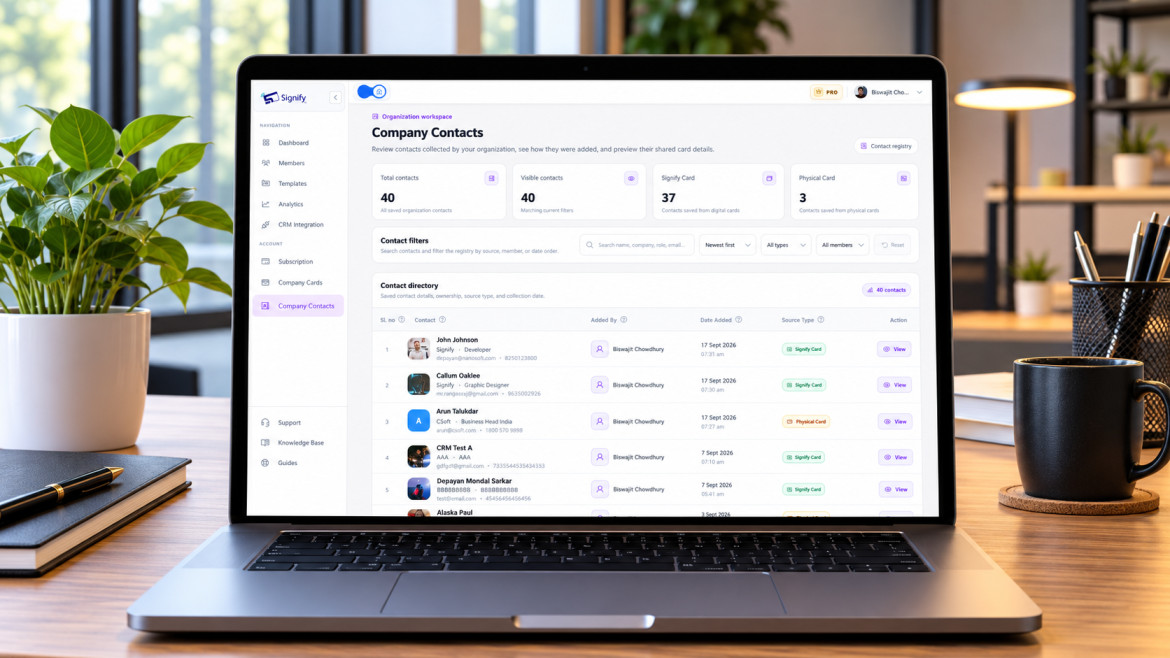
- View shared company contacts captured by any team member
- Monitor aggregate analytics and per-employee engagement
- Integrate captured contacts with your CRM
For organizations that also maintain a public-facing company page, Business Brief complements Signify Teams by giving your business a single branded page — with contact options, hours, location, and links to your employees' digital cards. Together, they replace a patchwork of printed collateral and static web pages with a single, coordinated digital presence.
Paper vs. Signify: cost comparison
For a mid-sized organization, the financial case for going paperless is usually decisive. The table below compares typical annual costs for a 250-employee company, based on figures from Signify's digital business card page.
| Cost category | Paper cards (annual) | Signify (annual) |
|---|---|---|
| Initial print run | $1,200 – $2,500 | Included in subscription |
| Reprints on role change | $800 – $1,500 | $0 |
| Design and proofing | $400 – $900 | Included in template |
| Shipping and storage | $150 – $300 | $0 |
| Digital platform cost | — | ~$950 |
| Total annual | ~$2,550 – $5,200 | ~$950 |
For most mid-sized teams, this translates to annual savings of $1,600 – $4,250 — before you factor in the value of analytics, lead capture, or brand consistency. Individual professionals typically spend less on paper cards, but the savings ratio holds: a Signify subscription is a fraction of the per-year cost of a professional print + reprint cycle.
Environmental impact: the case in numbers
For organizations with sustainability mandates, replacing paper cards is a low-effort, high-visibility win. Paper production consumes water, energy, and timber. Printing adds ink, transport, and waste. And static cards get reprinted every time a detail changes — compounding both the cost and the carbon footprint.
Signify's virtual business card page frames the sustainability argument directly: a single digital card eliminates the need for repeated printing, and because it's updatable, it eliminates the reprint cycle entirely. The carbon comparison for a mid-sized organization is measured in hundreds of kilograms of CO₂ avoided per year — before accounting for the transport and distribution costs of physical cards.
For ESG reporting, replacing paper cards is a measurable, low-cost action that most procurement teams can approve quickly. It removes a recurring waste stream, reduces procurement spend, and gives employees a tangible way to participate in environmental goals — without sacrificing their ability to network effectively.
Best practices for paperless networking
Switching formats is the first step. Getting the most out of a paperless card requires a few habits. These practices keep your digital presence current and your network engaged.
- Update the card when you update your LinkedIn. If your title, company, or contact details change, update your Signify card at the same time — or earlier. The card is the first thing a new contact sees.
- Verify all links before sharing widely. A broken social link or outdated portfolio URL undermines the point of a dynamic card. Check links when you create or edit.
- Test the QR and NFC every time you change your profile. Rare, but it happens: a card that worked last week can fail after a plan change or edit. A quick tap or scan confirms it's still live.
- Use branded templates for team deployments. Don't let 250 employees each design their own card. Use Signify Teams to enforce on-brand templates and central updates.
- Review analytics monthly. Use engagement data to decide which of your links to keep front and center. The field that drives the most clicks belongs at the top.
- Keep an NFC card for physical events. A physical Signify card signals intention and makes tapping frictionless. The combination of NFC + QR + link covers every scenario.
For a deeper walkthrough of card design and field setup, see our Signify Insights collection — including step-by-step guides for first-time card creation and advanced email-signature customization.
Frequently asked questions
Do recipients need an app to view my Signify card?
No. Your card opens directly in a web browser on any smartphone, tablet, or computer. There's nothing to download — a key advantage over app-only networking tools, as highlighted on Signify's digital business card page.
How does the NFC tap feature work?
Signify NFC cards contain an embedded chip. Tapping the card against a compatible iPhone or Android device opens your profile instantly. If the recipient's device doesn't support NFC, the QR code on the card provides a fallback.
Can I update my card after sharing it?
Yes. That's one of the defining advantages of a Signify card. Update your profile once and everyone who has your card — whether from a previous tap, scan, or link — sees the latest version automatically. No reprints, no stale information in circulation.
What is a dynamic QR code, and why does it matter?
A dynamic QR code lets you change the destination or content without regenerating the code. Signify's Smart QR Codes are all dynamic — so printed QR codes on materials, badges, or cards stay valid forever, even if your profile link or content changes.
Is Signify free to start?
Yes. Signify offers a free plan that includes two digital business cards, unlimited contact fields, basic analytics, unlimited sharing, and email signatures. Paid plans add more cards, custom branding, and team features. See the full breakdown on the pricing page.
How does Signify Teams help larger organizations?
Signify Teams adds centralized management: seat assignment, role-based access, branded templates, shared company contacts, team analytics, and CRM integration. It's designed for organizations that want brand consistency without manually managing every employee's card.
Can I use Signify for email signatures too?
Yes. Signify Dynamic Email Signatures let you deploy a consistent signature across your team. Updates propagate automatically, and you can embed campaign banners, booking links, or other CTAs.
What happens to my contacts if I switch from paper?
Signify captures contacts digitally. Recipients can share their details in exchange for your card, and those contacts can be organized, tagged, and synced to your CRM if you're on a team plan. Paper cards require manual entry — and most never get entered at all.
Does going paperless actually save money?
For most organizations, yes. A 250-employee company spending roughly $2,550 – $5,200 per year on paper cards can reduce that to approximately $950 per year with Signify. Individual professionals see the same ratio at a smaller scale. See the digital business card page for the full breakdown.
What if I still want a physical card to hand over?
Signify offers NFC cards (Canvas and Slate designs) that combine the tangible feel of a premium card with digital sharing. You hand over the card, and the recipient taps or scans to open your full digital profile. It's the best of both formats — without the waste of static print.
Ready to make your network paperless?
Create a free Signify digital business card, share it via QR, NFC, or link, and keep every connection current — without reprinting a single card.
Create your free digital card